Working with Sysmon
This blog post addresses two critical challenges when deploying Sysmon: filtering unwanted events and working with log data effectively.
Filtering Out Noisy Events
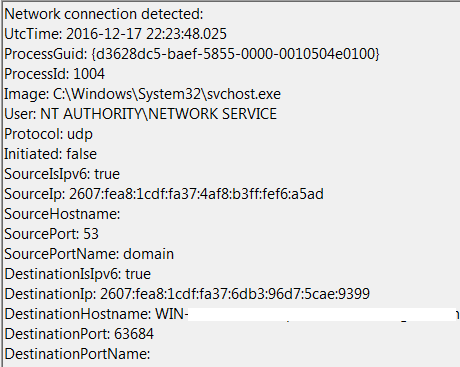
Using Sysmon’s configuration file to exclude unnecessary log entries is essential. Key filtering techniques include:
Protocol Exclusion:
<NetworkConnect onmatch="exclude">
<Protocol condition="is">udp</Protocol>
</NetworkConnect>
Process-Based Filtering:
<NetworkConnect onmatch="exclude">
<Image condition="end with">chrome.exe</Image>
</NetworkConnect>
Multiple Criteria Example:
<NetworkConnect onmatch="exclude">
<Image condition="end with">chrome.exe</Image>
<SourcePort condition="is">53</SourcePort>
<Protocol condition="is">udp</Protocol>
</NetworkConnect>
I recommend using “end with” for file paths and “is” for protocols or ports.
Monitoring Critical Processes
I strongly recommend monitoring lsass.exe and winlogon.exe access to detect credential theft tools:
<ProcessAccess onmatch="include">
<TargetImage condition="is">C:\Windows\System32\lsass.exe</TargetImage>
<TargetImage condition="is">C:\Windows\System32\winlogon.exe</TargetImage>
</ProcessAccess>
This configuration helps detect Mimikatz, which can dump credentials from within memory in clear text.
Working With Event Data
PowerShell scripts leveraging the Get-WinEventData module can extract and parse Sysmon logs.
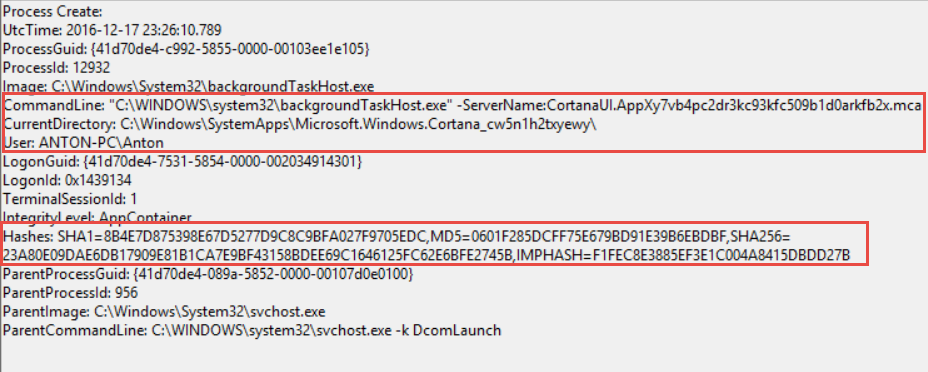
Event ID 1 (Process Creation) Example:
$EventsID1 = Get-WinEvent -FilterHashtable @{logname="Microsoft-Windows-Sysmon/Operational";id=1} | Get-WinEventData | select MachineName, TaskDisplayName, EventDataCommandLine, EventDataCurrentDirectory, EventDataHashes, EventDataUser

foreach ($Event1 in $EventsID1) {
    $output = Write-Output ( ('Sysmon_Event_1: ')+($Event1.TaskDisplayName )+ (' Machine Name:'+$Event1.MachineName )+ (' CMD:'+$Event1.EventDataCommandLine+" ")+ (' Dir: '+$Event1.EventDataCurrentDirectory )+ (' Hashes: '+$Event1.EventDataHashes )+ (' UserName: '+$Event1.EventdataUser ))
    Add-Content $File -Value $output
}
Key Takeaway
Certain mistakes / syntax errors in your configuration will be caught by Sysmon, but others will Bluescreen your system. Testing on a dedicated workstation is essential before production deployment.