Agent credential protection with fishbowl
Intro
Today, all of us in the technology space are tinkering with Claude, Codex and a bunch of other AI tools. We have a bunch of folders across multiple systems and are constantly feeding credentials to our AI-enabled workflows. We set environment variables, put tokens in config files and on disk and connect our agents to a bunch of systems.
While we tinker with AI agents, threat actors are on the prowl and are compromising various upstream packages that, when installed, have the potential to exfiltrate all the juicy credentials we’ve been giving up to our AI workflows.
This dynamic is nothing new and it existed years prior. Our systems are full of various credential files on disk and within file shares. Various stealers have been going after these types of credentials for years. Unfortunately, defenses have not really kept up. Personally, I’ve been writing about these kinds of “lesser-focused-on” credential avenues for a while, including my 2023 DEATHCon workshop where we looked at how to gain visibility into credential access avenues on Windows and Linux via SACL auditing and Linux auditd.
Generally, from a “blue team” perspective, it is difficult to get visibility into file access. These types of events are generally very noisy and require a lot of engineering elbow grease to operationalize. Anyone who has tried to wrangle Windows 4663 events in a large environment will know exactly what I’m talking about. EDRs do a great job of providing us defenders with rich telemetry, however, in most environments, it’s very difficult to answer the question of “who touched this file with a bunch of credentials in it?”
With this rise of AI workflows, this problem is only exacerbated. In other words, it’s very difficult to answer this question: what kinds of credentials are AI workflows touching, and are these credentials being accessed nefariously or exfiltrated?
I built fishbowl to help answer this very question. Fishbowl is designed to create a auditing perimeter around AI agents so that telemetry is generated when credentials that your AI workflow uses are accessed. Looking at the readme for fishbowl, it’s probably easy to get confused as to what exactly the tool does and how it operates, so I thought I’d put this blog together to demonstrate how it functions. In this blog, we’ll create our own malicious NPM package that exfiltrates Azure credentials to a local host to demonstrate where fishbowl helps provide visibility where none existed prior.
Before diving into the various sections of the blog, I’d like to call out what parts of this are AI-generated and which parts are good ol’ fashioned human-generated content. Fishbowl itself was vibe coded by me using Codex and Claude. The example malicious NPM package was also AI-generated. This blog, however, is 100-percent human generated by myself.
The Setup
A few weeks ago, I was working on some new modules for my AI Cyber Defense Ops course. These modules covered agent personas including a workflow where we query both Splunk and Azure Data Explorer (ADX) and then have an agent correlate the results. As part of this workflow, I had to give the agent credentials to both Splunk and ADX. Since I was running this in a local lab environment, the Splunk credentials just lived in a markdown file. The Azure credentials, however, were slightly more complicated. In order to access ADX via the command line, I had to install the az tooling on my machine, and then authenticate to my Azure tenant. As part of this authentication, credential files were created in /home/anton/.azure - so, to simply things, I had Splunk credentials living inside the project folder within a markdown file and also had Azure credentials living outside the project folder, under my home directory.
In our example, we’ll use a simulated malicious NPM skill to go after the Azure credentials, as these are ostensibly more attractive to a threat actor than local Splunk credentials.
Scenario 1 - No Fishbowl
Now that we have a good idea of where the various credentials are living, let’s over a few scenarios. We’ll start with the simplest scenario, installing our simulated malicious skill with no fishbowl wrapper at all.
The steps here are simple, we start Claude or Codex in our project directory like usual, then use ! for bash mode to install our malicious package.
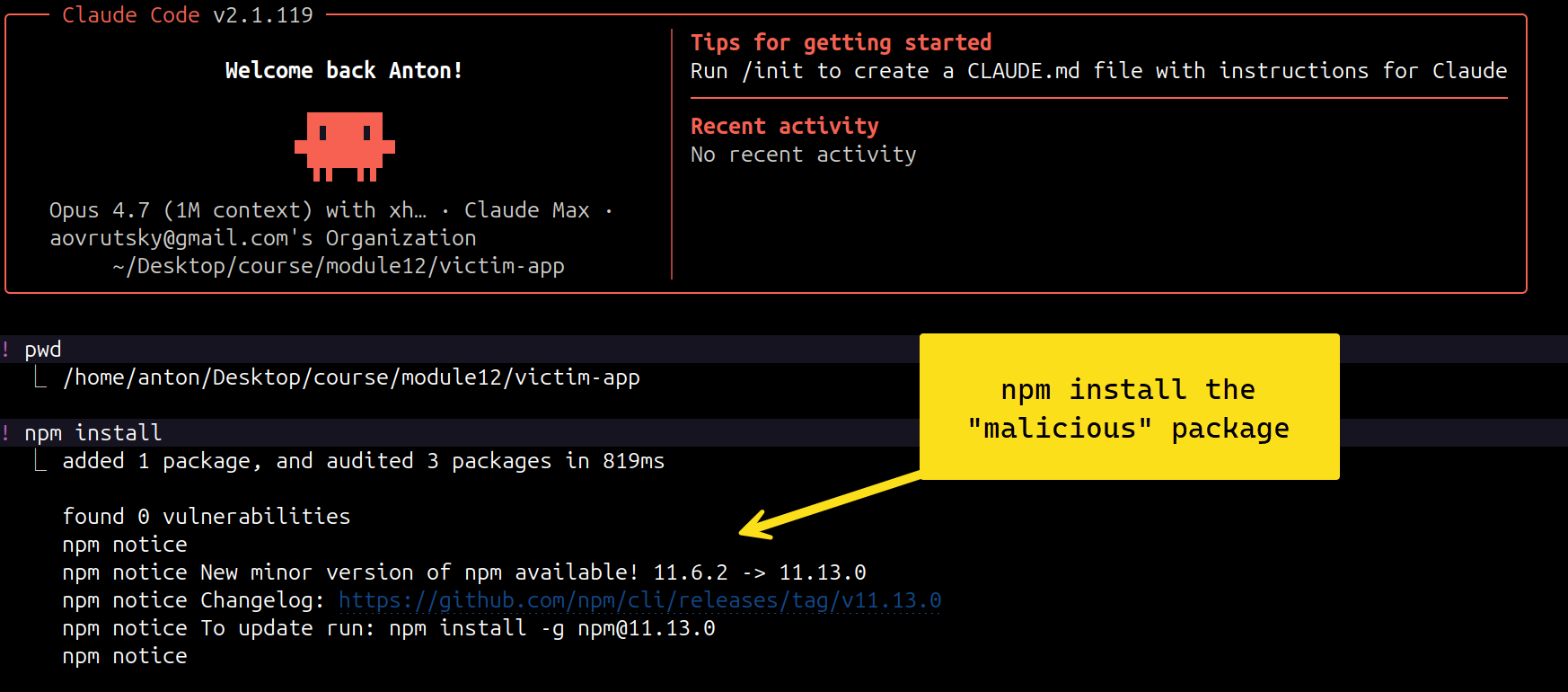
From a users perspective, this install went normally, we don’t see any errors at all and everything appears fine.
However, during this installation, this “malicious” NPM package silently exfiltrated the Azure token that I was using for this particular project:

This dynamic is a good demonstration of why supply chain compromise is so dangerous, as from a user perspective, this package could have been a legitimate one that was used for months without issue. Adding to this dynamic is that there is zero logging available that would illuminate this attack. If this host had a good auditd config, we might see the NPM package being installed. However, without specialized file access type logging, or strong network monitoring, we would have no idea that the Azure token was accessed, let alone exfiltrated.
Now let’s move onto scenario 2, using fishbowl without credential mounts.
Scenario 2 - Fishbowl without credential mounts
Okay, we scared ourselves with the first scenario and have now decided to check fishbowl out. Installing fishbowl is fairly simple:
curl -fsSL https://raw.githubusercontent.com/Antonlovesdnb/fishbowl/main/install.sh | shAnd then we just run it from the projects directory: fishbowl run
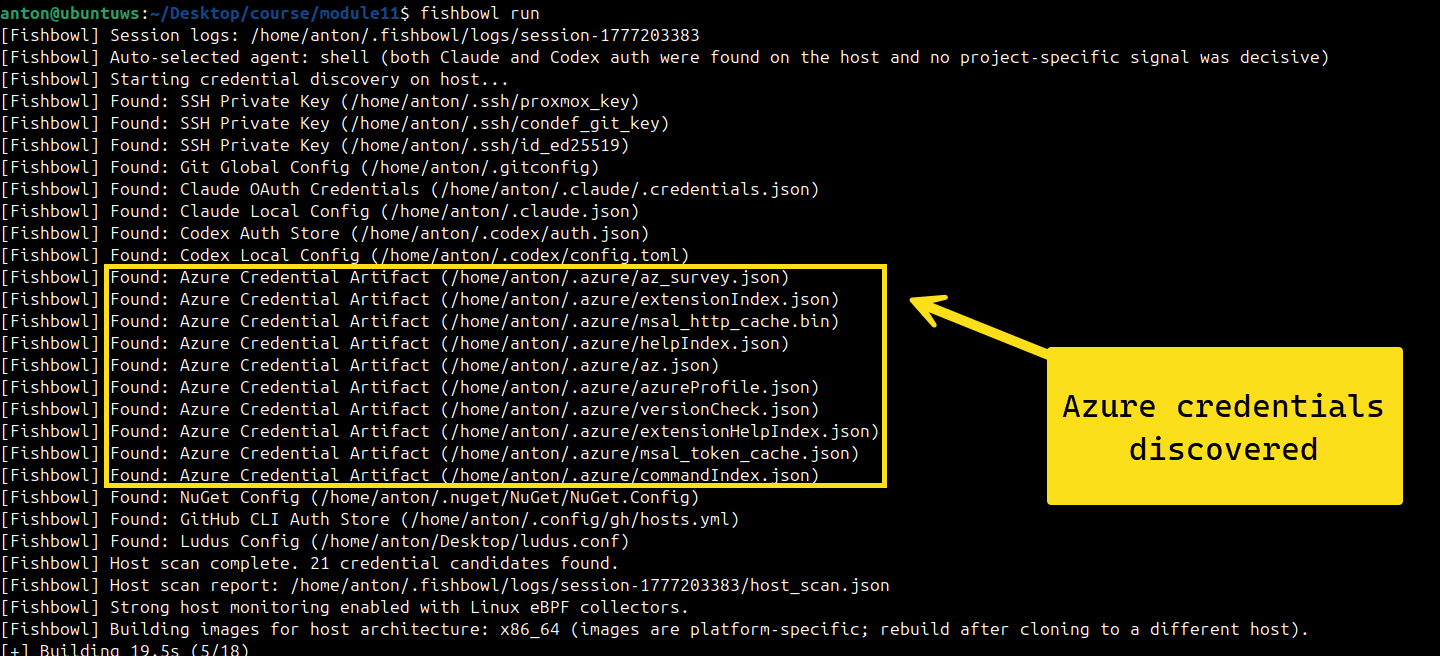
When we run fishbowl in a project directory, it discovers and locates our Azure credentials, excellent! Now let’s try our malicious NPM package again.
We go ahead and install the malicious package:
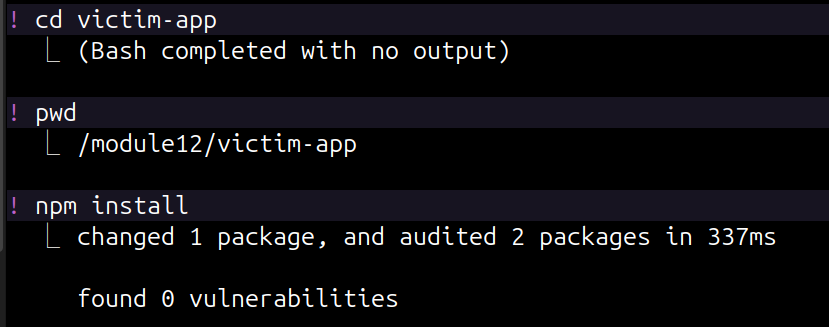
However, this time, when we check our exfil server, it’s just sitting there empty, lonely and sad:

Where are the credentials? In this case, the Azure credentials were discovered by fishbowl, but since it was started without the -mount flag, the credentials were not accessible from within the fishbowl container. This is a good example of the first layer of protection you get with fishbowl, a sandboxed environment that doesn’t have access to all the credentials that a host-only type set up would have. Of course, there is a trade off here in that Azure functionality would not work in this case, unless specifically mounted. It should be noted that any environment variables set would be useable in this container and would generate an audit trail when accessed.
Having covered scenario 1 - no fishbowl at all and scenario 2 - fishbowl without mounts, let’s move onto the fun part, scenario 3, where we actually mount the Azure credentials and exfiltrate them.
Scenario 3 - Fishbowl with credential mounts
In this scenario, we’ll run fishbowl with explicit mounts:

What this means is that the msal_token_cache.json and azureProfile.json files will get mounted into the creds directory of our fishbowl container.
This time, our Azure tokens get successfully exfiltrated, as they were accessible from within the container:

The big difference between scenario 1 and scenario 3, is that this time, we have an audit trail. Now, if we go back to our host and run fishbowl audit we’ll see that fishbowl identified a few critical events

fishbowl audit gives you a high level overview, but all the logs from the session are stored on the host as well:
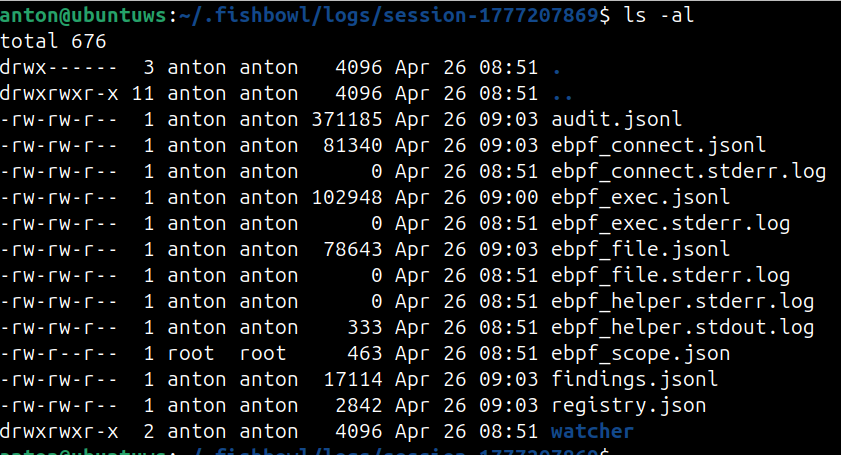
audit.jsonl is the main audit file containing all the credentials access information from our fishbowl session, so let’s upload that to Splunk and do some hunting!
Let’s start by looking at credential access and network egress events. Remember, these events didn’t exist outside of fishbowl, they are only generated when you utilize fishbowl to run one of your projects.
index=fishbowl (event=credential_access OR event=network_egress)
  | eval kind=event
  | stats min(_time) as first_seen
          values(eval(if(kind="credential_access", path, null()))) as creds_read
          values(eval(if(kind="credential_access", classification, null()))) as cred_kinds
          values(eval(if(kind="network_egress", destination.":".destination_port, null()))) as destinations
          values(process_cmdline) as cmd
          values(process_chain) as chain
          count(eval(kind="credential_access")) as cred_count
          count(eval(kind="network_egress")) as egress_count
    by observed_pid process_name
  | where cred_count>0 AND egress_count>0
  | eval verdict="cred-then-egress (suspected exfil)"
  | table first_seen verdict process_name observed_pid cred_kinds creds_read destinations cmd chain
  | sort first_seen
In this query, we look at credential_access or network_egress events to get a sense of what processes are touching our credentials and if any credentials are being egressed outside of our network. Fishbowl will also log a full process chain for you, so you can get a sense of process lineage or process tree. When the events are viewed in this way, our malicious NPM package sticks out a bit:
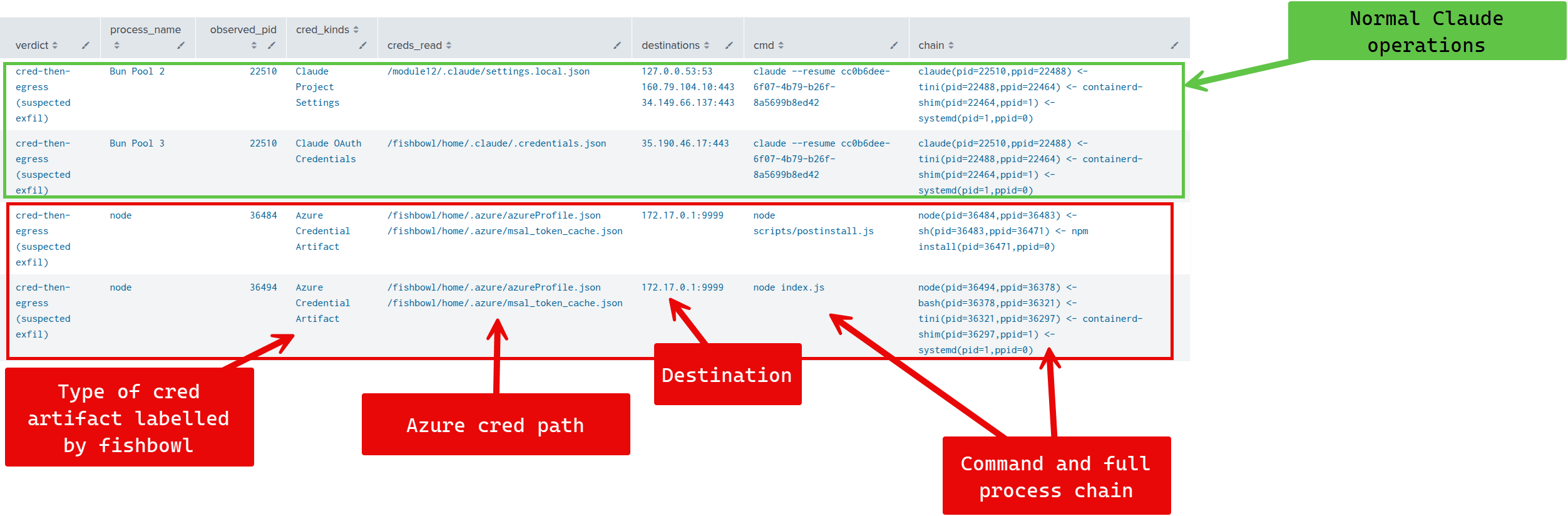
We can see from the query results a few interesting items:
-
A full credential classification category, which comes from the fishbowl credential classification engine, which knows that
msal_token_cache.jsonbelongs to Azure -
The actual credential files being read
-
The destination ( ip:port ) to where these credentials are being sent
-
The full process chain
node(pid=36494,ppid=36378) <- bash(pid=36378,ppid=36321) <- tini(pid=36321,ppid=36297) <- containerd-shim(pid=36297,ppid=1) <- systemd(pid=1,ppid=0)In this case, we see the bash to bode system lineage and see the exact command that triggered our credential exfiltration. We now know that the Azure tokens were sent to
172.17.0.1:9999and can investigate from thereWe can also zoom out a little bit, and look at what credential categories were being accessed by which processes
index=fishbowl event=credential_access operation=openat
| stats values(process_name) as proc, values(process_cmdline) as cmdlines values(path) as paths,values(process_chain) as process_chain by classification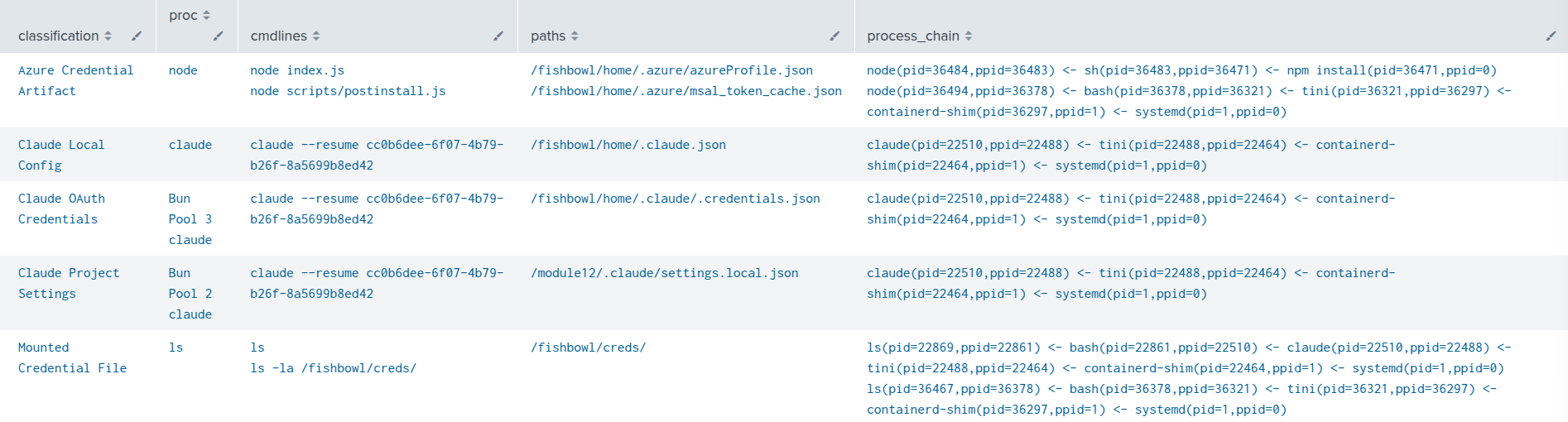
We can see the credential classification categories on the left hand side, which makes interpreting the results a little bit easier. We can also see the process, command line and actual process chain that accessed out credential files. In this case, we see a node accessing our Azure credentials. From here, we can decide if this is normal activity or not and dig deeper into the network side of things as we did above.
Once we’ve keyed in on what credential file or event looks interesting, we can generate a Sankey visual with the following query:
index=fishbowl
    ( (event=credential_access AND (path="*msal_token_cache.json" OR path="*azureProfile.json"))
      OR (event=network_egress AND destination_port=9999)
      OR (event=process_exec AND (process_cmdline="*postinstall*" OR process_cmdline="node index.js")) )
  | eval step=case(
      like(process_cmdline,"%postinstall%"), "postinstall hook",
      process_cmdline="node index.js",       "node index.js",
      1=1, null())
  | where isnotnull(step)
  | eval cred=case(
      like(path,"%msal_token_cache.json"), "msal_token_cache.json",
      like(path,"%azureProfile.json"),     "azureProfile.json")
  | eval dst=if(event="network_egress", destination.":".destination_port, null())
  | eval edges=case(
      event="process_exec",      mvappend("helpful-logger§"+step, "__skip__§__skip__"),
      event="credential_access", mvappend(step+"§"+cred, cred+"§exfiltrated to attacker"),
      event="network_egress",    mvappend("exfiltrated to attacker§"+dst, "__skip__§__skip__"))
  | mvexpand edges
  | eval source=mvindex(split(edges,"§"),0)
  | eval target=mvindex(split(edges,"§"),1)
  | where source!="__skip__"
  | dedup observed_pid source target
  | stats count as value by source target
  | sort source target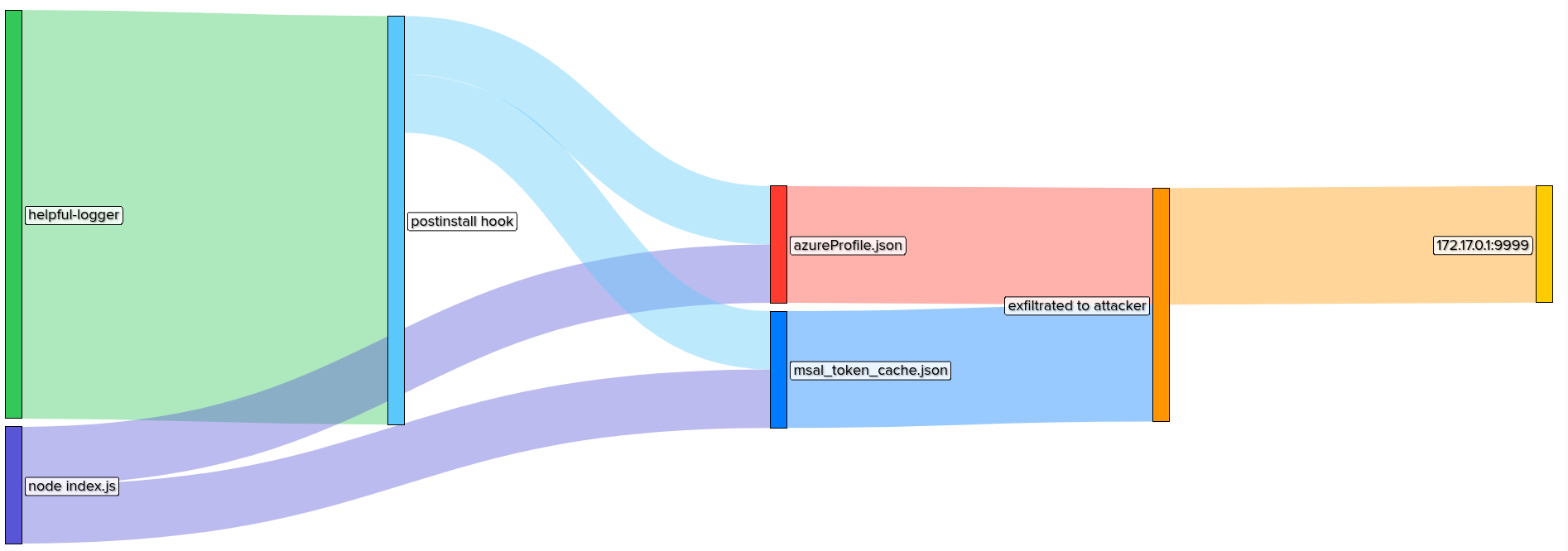
Wrap up
Hopefully this little blog did a decent job of demonstrating how fishbowl works and what kind of attacks it’s designed to illuminate. It should be noted that fishbowl won’t block anything and that’s by design. This project was designed to create visibility where none previously existed. Using fishbowl, you now have a strand of telemetry that simply didn’t exist without it. This demo utilized a malicious NPM package to simulate a supply chain attack, but similar vectors can exist for malicious skills or environment variable hijacking - fishbowl is designed to get you visibility into these aspects as well.