Introducing ConDefConstructor - The Ultimate Assistant
TLDR
I created a “ConDefConstructor” agent that goes through the entire Constructing Defense course, takes notes, finds issues and enhancement areas and then feeds those back into the student-facing MCP server so that the Constructing Defense MCP can act not just as an AI assistant, but a troubleshooting helper with full context as well!
Intro
Constructing Defense currently consists of: 48 modules, 300+ images and 200+ Splunk & Malcolm queries. It spans Windows, Linux, and Kubernetes as well as including various telemetry sources including networking monitoring via Malcolm.
Since it’s inception, hundreds of participants have gone through the course. Modules have been added, the lab build has been automated and a new MCP server has been introduced.
Everything in the course happens “live” - that is, you execute things that generate telemetry and then you use various tool to examine this telemetry, building detections and understanding various attack techniques and tooling as you go. This “hands on” approach benefits participants of the course greatly, as you are not looking at pre-generated telemetry, but rather doing the tool executions yourself to generate said telemetry. This way, you understand both sides of the attack-defense coin.
This type of dynamic is a critical component of Constructing Defense and is one of the ways that the course differentiates itself in a very crowded field of cybersecurity training. One of the downsides of this dynamic, however, is that things tend to break.
For example, to get a Sysmon Event ID 1 entry into Splunk, the flow looks something like:
- The event is generated on the Windows machine
- The Splunk universal forwarder installed on this machine reads the event log
- The event is parsed by the Splunk add-on for Windows application, processed and sent to its relevant Splunk indexer
- The participant uses a Splunk query to search for this event
Already in this simple execution flow, a bunch of variables are introduced:
- A Windows update may change how Event Logs are formatted
- A Sysmon update may change how the config works
- The Splunk add-on for Windows application may change how Windows events are stored in Splunk
This may mean that a query found in the course that worked when it was originally crafted, may not work at a later time.
From an instructor (my) perspective, this dynamic is something I spent a lot of time thinking about. Most folks who take this kind of course do so while juggling other responsibilities, both professional and personal. This means that student time is a precious commodity and I spend a lot of my time thinking about how to balance the complexity of Constructing Defense with ease-of-use, so that students of the course have the best possible experience. I would much rather students spend their time going through the course materials, tinkering with the lab, playing with TTPs and telemetry rather than troubleshooting issues.
Solutions
Given the framing above, what solutions exist for this problem - how do I ensure that everything in Constructing Defense is up to date and functional, no matter if Splunk, Splunk apps or operating systems get updated.
One obvious solution is for me to go through all the materials myself, and make changes as I find issues. This approach does indeed work and is something I do regularly. However, the time I spend doing this takes away from the time I can spend enhancing the course. This is a classic maintain versus build problem.
As I spent more time with Claude and building the Constructing Defense MCP, I began to form a pretty radical idea: what if I built an agent that goes through the course for me at regular intervals, takes notes, finds issues and then feeds those back into the existing MCP architecture.
On the surface, this seems like an easy and straight forward idea. When rubber hit the road, however, I discovered a ton of nuances and issues. The lessons I learned along the way and the agent architecture that spawned from countless hours of troubleshooting resulted in something very cool and novel being built. I want to utilize this blog to showcase what was built, and how I got from point A to point B, articulating a lot of failures along the way.
First Kick at the Can
The first module of Constructing Defense is very simple, designed for folks who have never touched a Windows Event before - you simply open command prompt, type in whoami /groups and take a look at the telemetry in Splunk - easy peasy!
I thought this would be a great lesson for the newly built agent to try. I Googled around a little bit, found a VNC MCP, set up VNC and let the agent follow the lesson plan. WOW! Everything worked perfectly. The agent connected to the host, opened command prompt, typed in whoami /groups and then opened a web browser, executed the Splunk query and looked at the results.
Dang, I thought, this will be easy, let’s move onto the next lesson.
The next lesson is a little bit more complex - it involves two machines, a Linux host and Windows host. What was a super smooth first-run turned into a disaster super quickly. The agent couldn’t connect to two machines simultaneously via VNC and had issues clicking into tighter spaces within the host, like a browsers address bar.
Okay, no problem, I thought to myself - let’s tighten up the prompt and try RDP instead.
Claude and I went back to the drawing board, re-architected the agent to use RDP rather than VNC and then gave the execution another shot.
This is where the real frustrations began. Connecting to hosts via RDP and executing the modules bubbled up a ton of issues, including:
- Misclicks
- Timeouts
- Sessions disconnecting
- Sessions not being established due to previous sessions being disconnected vs logged out of
Iterations here went on for weeks, including a custom MCP for Devolutions IronRDP and Apache Guacamole
Some module executions runs were successful using these methods, particularly IronRDP, however, a session would always time out, get stuck, get disconnected or proved to be generally unreliable.
At this point, you may be asking: why not just use WinRM or SSH ? This is a fantastic question - the reason why I wanted to avoid SSH/WinRM for module executions is that this does not mimic the student experience. It would work for some modules for sure, but for others, it would mess up the process chain of executions and would generally not be a representative experience.
At this point, I was almost ready to give up. Module execution would constantly error out for one reason or another and the agent had issues getting through more than one module at a time. I had to find a different approach.
Phase 2
After furious prompting and Googling - it hit me, the lab lives in Proxmox, so why don’t we use QMP instead?
Some QMP MCP tools existed, but none that would exactly what I needed, so Claude and I built a new one with architecture that looks like:
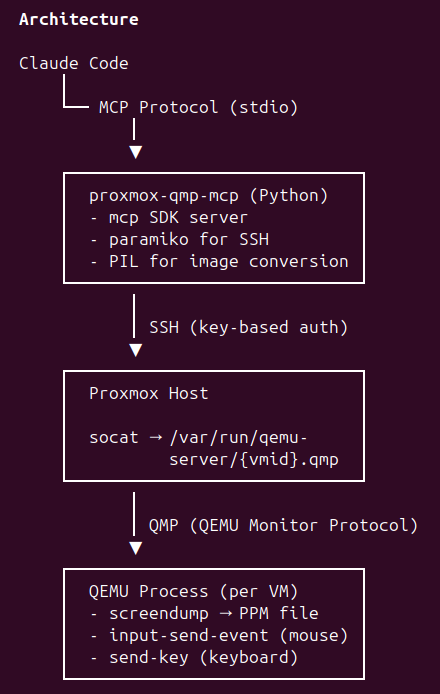
Now, the agent could accurately click on elements inside the VM, it could also send key and mouse inputs, as well as take screenshots of the host.
This approach worked much better than the existing RDP/VNC solutions, the connection did not time out, clicks and mouse movements were accurate and the MCP server was saving a screenshot to a folder at a regular intervals so I could see the progress the agent was making.
This approach worked well enough, however, when it came time to execute Splunk or Malcolm queries, the agent would open a web browser, type the query out into a text file to avoid escaping issues, paste it into a Splunk window, and would read the result back. This approach worked, but was painfully slow.
Existing Claude browser automation via Playwright worked well enough, but like the scenario described above, was just painfully slow. At this point, I discovered agent-browser by Vercel labs. This uses a headless browser, controlled via CLI and worked exponentially quicker than the old way of executing Splunk queries.
So at this point, I had a semi-working flow. The agent would connect to the VMs via the custom QMP MCP to perform executions, and then would use agent-browser to run the Splunk and Malcolm queries — perfect! Or, is it?
Phase 3
Up until this point, I was invoking the agent with a custom skill /condef so I would run /condef 1 to execute module 1, for example. This approach worked fine, but what if the machine I was using died, or I wanted to run the agent from another machine?
The other issue I ran into was that I had very little observability into what the agent was doing once I let it loose.
Compounding this issue was that agent-browser was having issues with login tokens expiring or timing out, and would have to constantly reauthenticate to Splunk and Malcolm, slowing execution down and wasting my precious tokens.
The overall concept worked, but lacked polish, observability and was tied down to the virtual machine from which I was running Claude from, as it had the relevant notes, context and prompts.
Phase 4 - Current State
At this point, the overall concept worked, but lacked portability and observability. The agent that ran the executions and had the necessary prompts and notes was installed on a virtual machine I was using for testing and once the agent was launched, I had little insight into what it was doing.
The first step here was to build a dashboard from which I could run modules - within this dashboard, I would also get screenshots from the current virtual machine the agent was on, as well as a detailed execution log. The dashboard would also flag any issues that the agent found:
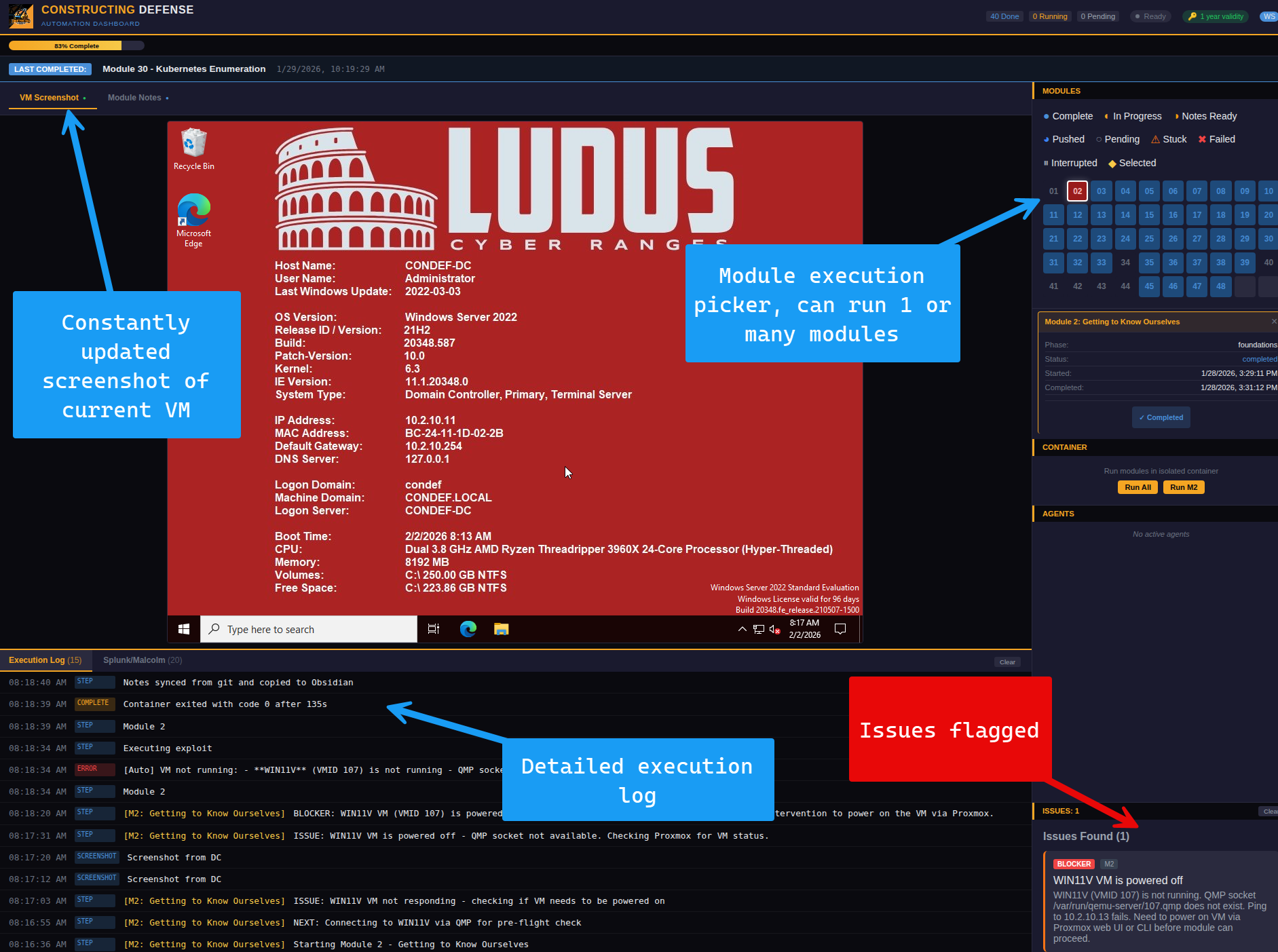
The dashboard looked great at this point - however, here I ran into an issue. When a module executed via the dashboard, it would spawn a new Claude instance, and this Claude instance did not have the various prompts, notes and context from the main execution agent I was working with.
This newly spawned agent only had access to a basic prompt that was not rich enough for it to successfully execute and go through each module.
The solution that I came up with here was to package up the course content, course notes, skills, scripts and prompts into a Docker container and have the container be pulled upon a module execution via the Dashboard.
The final architecture looks something like this:
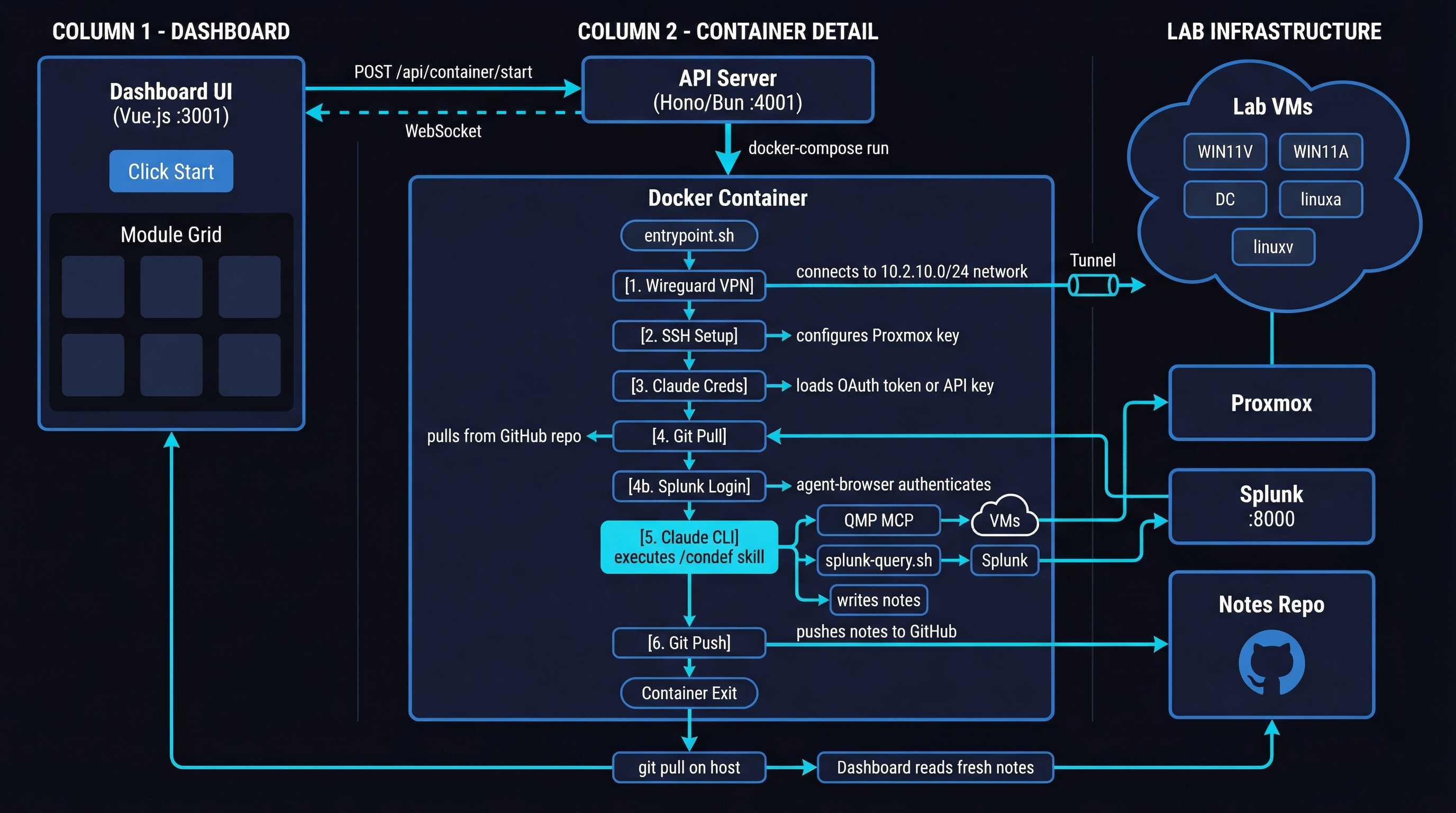
When I pick and execute a module from the Dashboard, the container is started and uses Wireguard to connect to the Proxmox network where the Constructing Defense VMs live. It then sets up SSH to connect to the Proxmox host, as well as the Claude OAuth token so that the Claude session doesn’t expire as the agent is going through the course.
After this, the container pulls the latest course content, course notes, a custom CLAUDE.md, skills and scripts from a Git repo.
The custom ConDef skill within the container uses a mix of QMP MCP, custom scripts and agent-browser to perform course operations. All operations are optimized to balance the mimicking of student experience and execution speed. Where there’s no need for GUI operations, for example, Splunk and Malcolm are queried directly via their respective APIs. Where GUI operations are required, for example, for something like configuring Mythic, the QMP MCP is used.
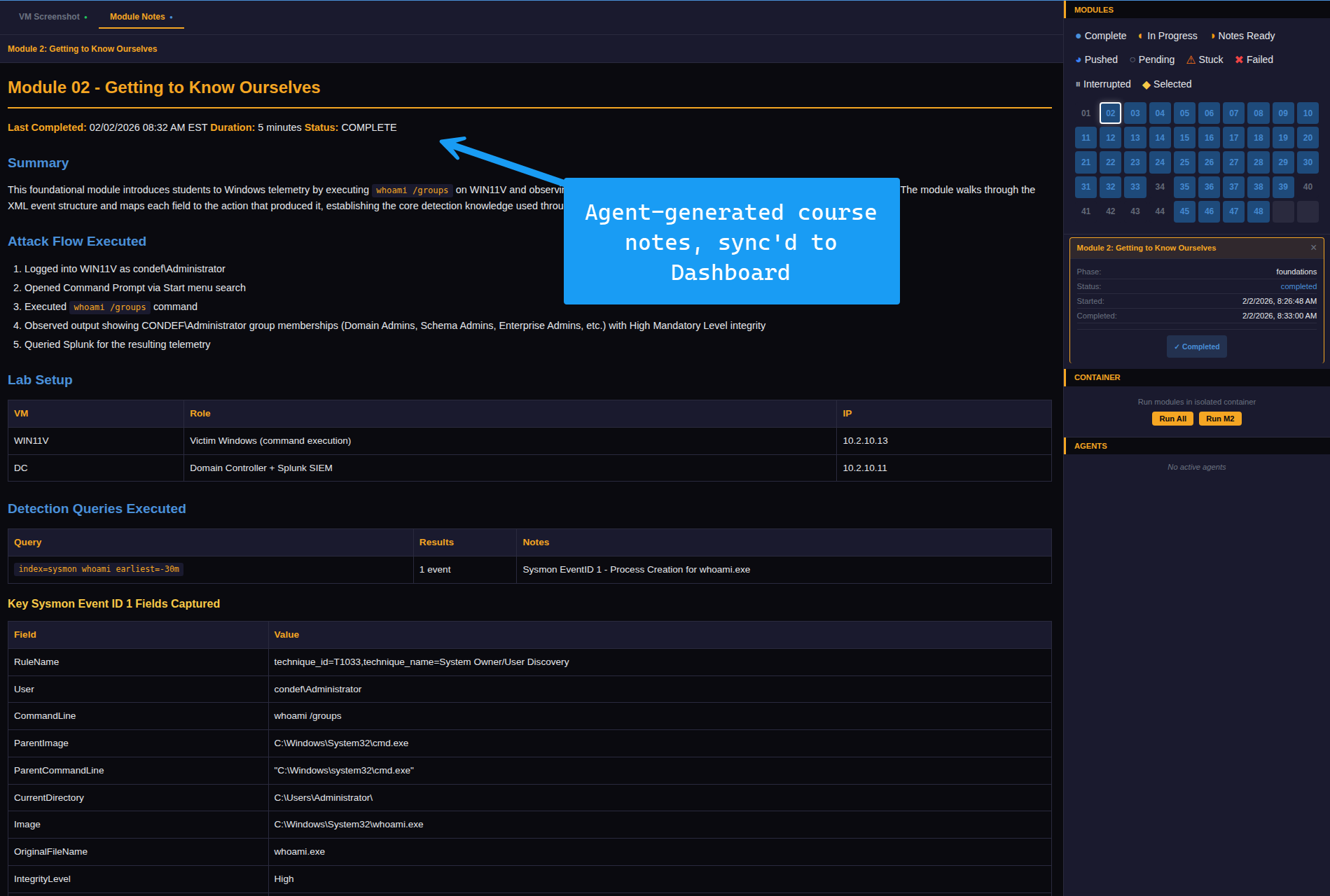
When the agent completes it’s execution, it compiles execution notes and pushes them to the Git repo, once that is complete, the Dashboard then performs a git pull so that notes are always current for both myself and the agent. This way, if an issue is fixed in the course, the agent will know about that and will avoid duplicate work.
Now, even if my development VM dies, all I have to do is restore the Dashboard and it will pull the agent, which I dubbed “ConDefConstructor” from the git repo. The agent will then be able to execute the course, generate notes as normal.
But what does this mean for me ?
Anton, this is cool, you may be thinking to yourself, but how does it benefit me as a participant or student of Constructing Defense.
Well, this is a great question! If you recall, I recently released the Constructing Defense MCP. This MCP comes with a bunch of different tools, allowing you to map different lessons in Constructing Defense to MITRE ATT&CK, get additional Atomic Red Team tests, export the course to an Obsidian notebook and so much more. You can check out the full list of features for the MCP in the free preview available here.
Since the ConDefConstructor agent takes notes as it performs all the executions and operations found in the course, it has all the information needed to be not just a “teaching assistant” but also a troubleshooting agent.
What’s cool about this is that the troubleshooting steps are unique and scoped to Constructing Defense, minimizing token usage & hallucinations for those using the MCP. In other words, the agent relies on it’s own troubleshooting notes, generated by actually performing the modules in the course.
Here’s a few examples of what this looks like in practice - in the below example, I ask for help in troubleshooting a query and explaining it more in-depth.
You can see that Claude begins to answer the question posed by listing the modules in course, and then referencing it’s own notes
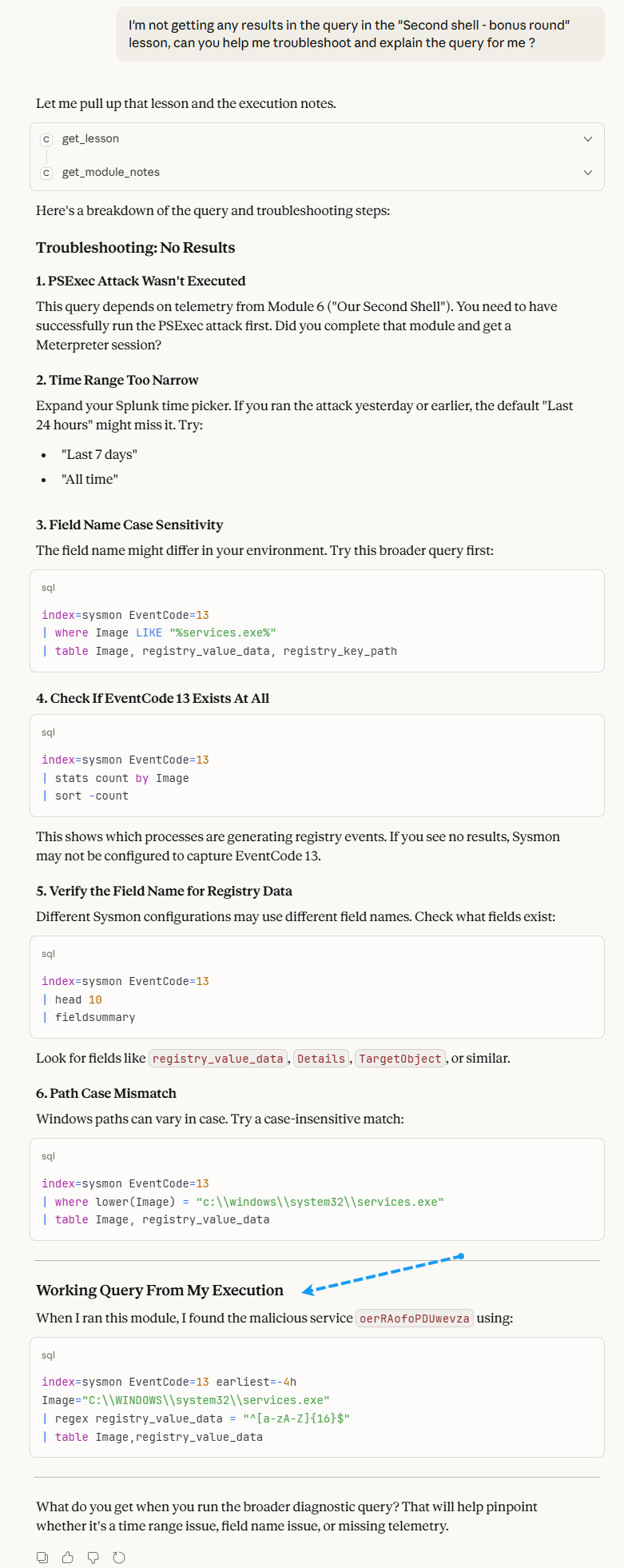
At the bottom of the response, Claude helpfully provides a working query that the ConDefConstructor agent ran during it’s latest execution.
Now, with the ConDefConstructor agent in place and it’s notes integrated into the student-facing MCP, I have a working flow whereby the agent is constantly executing Constructing Defense modules, telling me what’s broken so I can fix it and then integrating its learnings into the student facing MCP.
Of course, the usual support channels are still open, but now students are armed with a powerful troubleshooting assistant that uses actual course notes from actual course executions, instead of making stuff up!
Conclusion
Thank you for making it this far! In this blog, I covered how I built the “ConDefConstructor” agent and integrated its notes and findings into the current student-facing Constructing Defense MCP. As the agent iterates on subsequent course executions, folks who have bought and interacted with Constructing Defense should start to notice various tweaks and enhancements to lessons as issues are found and fixed.
In the future, I also hope to integrate ConDefConstructor into a CI/CD pipeline for the lab build itself. This way, I’ll have a full end-to-end build of Constructing Defense, lab gets built, agent runs, takes notes, lab gets torn down — rinse repeat.
Perhaps a part 2 to this blog will be coming in the future :)